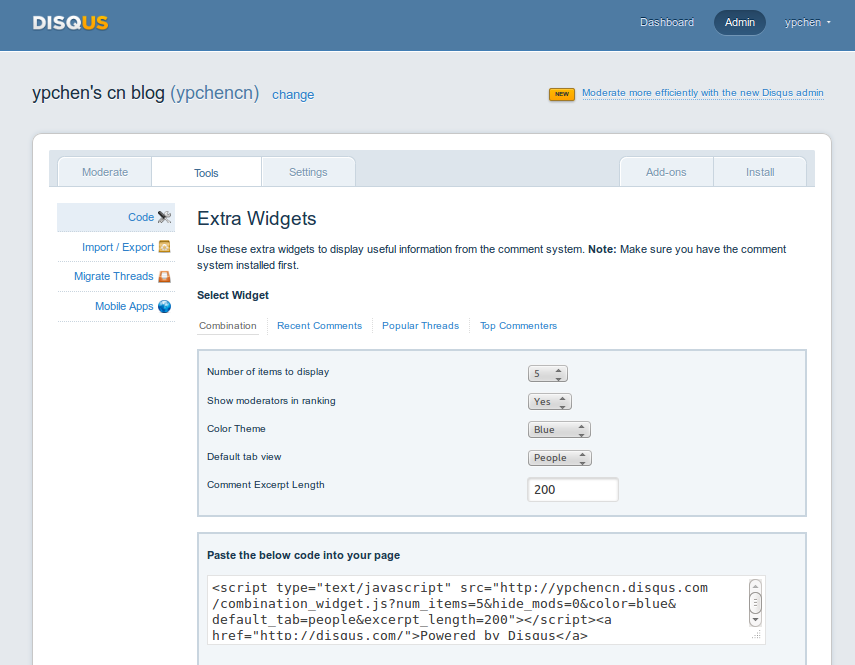
<sectionid="comment_sidebar"><h1>近期评论</h1><script type="text/javascript"src="http://ypchencn.disqus.com/recent_comments_widget.js?num_items=5&hide_avatars=0&avatar_size=32&excerpt_length=20"></script><ahref="http://disqus.com/">Powered by Disqus</a></section>
# list each of the sidebar modules you want to include, in the order you want them to appear.# To add custom asides, create files in /source/_includes/custom/asides/ and add them to the list like 'custom/asides/custom_aside_name.html'default_asides:[asides/recent_posts.html,custom/asides/recent_comments.html,custom/asides/blogroll.html,custom/asides/weibo.html,custom/asides/copyleft.html,custom/asides/feed.html]# Each layout uses the default asides, but they can have their own asides instead. Simply uncomment the lines below# and add an array with the asides you want to use.blog_index_asides:[custom/asides/about.html,asides/recent_posts.html,custom/asides/recent_comments.html,custom/asides/blogroll.html,custom/asides/weibo.html,custom/asides/copyleft.html,custom/asides/feed.html]post_asides:[asides/recent_posts.html,custom/asides/recent_comments.html,custom/asides/blogroll.html,custom/asides/weibo.html,custom/asides/copyleft.html,custom/asides/feed.html]# page_asides: